WebP is the right default for almost all web images in 2026. It produces files 25-35% smaller than JPEG at the same visual quality, supports both transparency and animation, and is supported by every modern browser including Safari. JPEG and PNG still have specific use cases — but WebP should be your starting point unless you have a reason to use something else.
Related: once you have picked a format, see our tested list of free TinyPNG alternatives for compressing it without size caps.
Quick Comparison Table
| Feature | JPEG | PNG | WebP |
|---|---|---|---|
| Best for | Photographs | Graphics with transparency | Almost everything on the web |
| Compression type | Lossy only | Lossless only | Both lossy and lossless |
| Transparency support | No | Yes | Yes |
| Animation support | No | No (use APNG) | Yes |
| Typical file size (1MB photo) | 800KB | 2.5MB | 550KB |
| Browser support | Universal | Universal | All modern (since 2020) |
| Editing software support | Universal | Universal | Most modern editors |
| Best use case | Email, print, legacy | Logos, icons, screenshots | Web photos, web graphics |
Real File Size Comparison
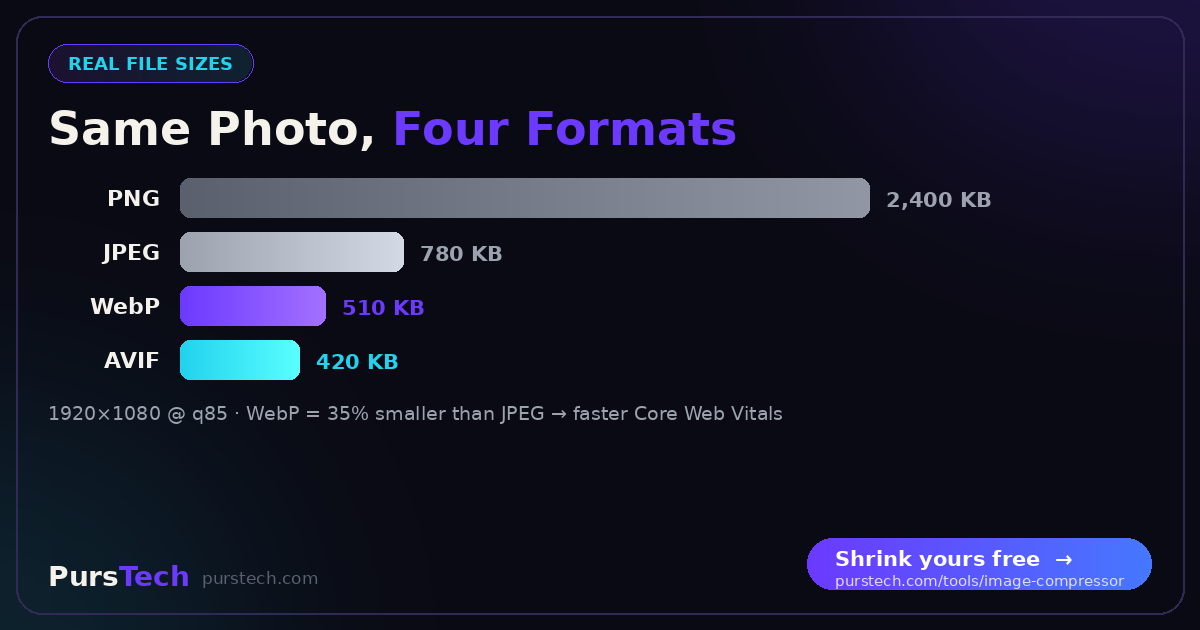
Take a typical web hero image — a 1920×1080 photograph. Here's how each format compresses it at "good quality" settings:
• Original RAW: 12MB
• JPEG (quality 85): 780KB
• PNG (lossless): 2,400KB
• WebP (quality 85): 510KB
• AVIF (quality 85): 420KB
WebP delivers 35% smaller files than JPEG at the same visual quality. On a website with 20 images, that's the difference between an 18-second mobile load and a 12-second load — directly improving Google's Core Web Vitals score.
When to Use Each Format
Use JPEG when:
• Sharing photos via email or messaging apps (universal compatibility)
• Working with print workflows that require CMYK and specific color profiles
• Cameras and phones default to JPEG — no reason to convert unless using on the web
• Older content management systems or platforms that don't accept WebP uploads
Use PNG when:
• Logos, icons, and brand assets that need lossless quality
• Screenshots and diagrams where text crispness matters
• Graphics that require transparency for use over multiple backgrounds
• Source files you will edit multiple times — each PNG save preserves quality
Use WebP when:
• Any image displayed on a website or web app
• Photos used in blog posts, product pages, or galleries
• Replacing existing JPEGs or PNGs for performance gains
• Animated graphics where MP4 video is not suitable
How to Convert Between Formats
Using the PursTech Image Compressor:
Step 1: Drag your image onto the upload area, or click to select.
Step 2: Choose the output format (WebP, JPEG, or PNG).
Step 3: Set the quality level. For WebP, 80-90 is typically the sweet spot.
Step 4: Click Compress. Processing happens in your browser — nothing is uploaded.
Step 5: Download the converted file. You will see the exact size reduction.
Quality Settings That Actually Matter
Most compressors use a 0-100 quality scale, but the values are not interchangeable across formats. Here are the practical sweet spots:
JPEG: 75-85 for web images. Below 70, compression artifacts become visible. Above 90, file size increases dramatically with no visible improvement.
WebP: 75-85 for photos, 90+ for graphics with sharp edges. WebP's quality scale is similar to JPEG but slightly more aggressive — quality 75 in WebP looks like quality 80 in JPEG.
PNG: No quality slider (always lossless). Optimization tools can reduce PNG size 30-50% by removing unused color data and metadata, with zero visible change.
Browser Support Reality in 2026
According to caniuse.com, WebP has 97%+ global browser support as of 2026. The only browsers without WebP support are versions of Internet Explorer (officially retired) and Safari versions older than 14 (released in 2020).
For any practical web audience, you can serve WebP without a fallback. For maximum compatibility — say, an enterprise audience that may still run old browsers — use the HTML <picture> element to serve WebP to modern browsers and JPEG as a fallback.
Why This Matters for SEO
Page speed is a confirmed Google ranking factor, and images are the single largest contributor to slow pages. Switching from JPEG to WebP often produces a 30%+ reduction in total page weight — directly improving Largest Contentful Paint (LCP), a Core Web Vitals metric Google uses for rankings.
Independent studies consistently show pages that load in under 2.5 seconds have lower bounce rates than pages taking 4+ seconds. For tool sites and content sites where users come from search, image format choice is one of the easiest wins available.
The Bottom Line
For new web content in 2026, default to WebP. The compression gains are real, the browser support is universal, and the workflow is no different from JPEG. Keep JPEG for sharing photos with non-web destinations (email, social media that re-encodes anyway), and reserve PNG for logos and graphics that need lossless quality. Convert existing JPEGs to WebP when updating pages — the page-speed benefit is immediate.