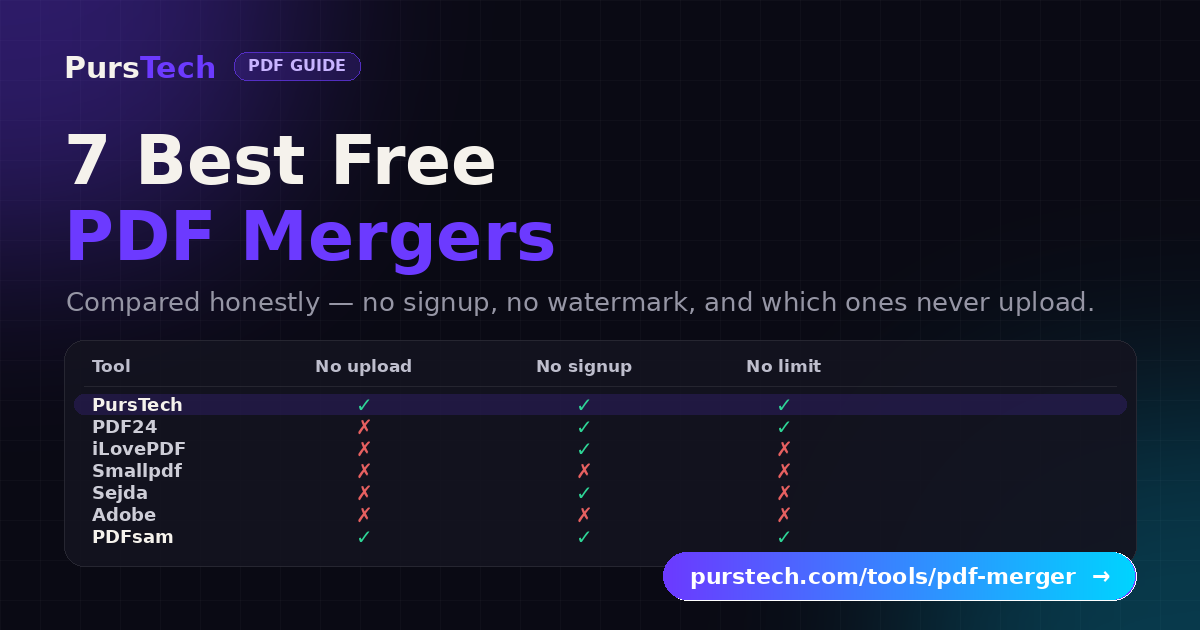
Merging PDFs is the most ordinary document task there is — bolt a cover letter onto a CV, staple twelve monthly invoices into one file, combine a contract with its exhibits. And yet the free tools that do it are a minefield: one stamps a watermark across every page, the next asks you to make an account, a third says you have used your two free tasks for the day, and nearly all of them quietly upload your file to a server first. This guide compares seven free PDF mergers honestly. Full disclosure: we built one of them — which is exactly why we know which corners the others cut, and we have kept the comparison fair enough that the other six get real credit where they earn it.
The Quick Answer
Privacy (no upload): merge in a tool that runs entirely in your browser — the PursTech PDF Merger — so your files never leave your device.
No limits, no signup on a server tool: PDF24 Tools — genuinely unlimited free use, at the cost of ads and a server upload.
Huge batches (50+ files, 100 MB+): iLovePDF's queue handles heavy sets well, if you can live with one task per hour.
Perfect formatting fidelity: Adobe Acrobat online, where every form field, bookmark and hyperlink survives.
Confidential or offline work: PDFsam Basic, a free open-source desktop app that never touches the internet.
What We Checked
A free merger in 2026 has to clear five bars: no watermark on the output, no forced signup, a workable free-tier limit (not two tasks a day), a sane file-size cap, and — the one most comparisons skip — a clear answer to where your file is processed: on your own machine, or uploaded to someone else's server.
Why "Where It's Processed" Matters
PDFs are the format people use for exactly the documents they should be most careful with: contracts with financial terms, medical records, ID scans, tax returns, salary letters. With an upload-based tool, that file travels to a server, gets merged, and comes back — and you are trusting the provider's handling and deletion policy, however good it is. With a browser-local tool, the merge happens on your device and the file never leaves it, so there is simply nothing to trust. Neither model is wrong for a holiday itinerary; for anything sensitive, local processing removes the question entirely.
The 7 Free PDF Mergers, Compared Honestly
1. PursTech PDF Merger — private, no upload, no signup
The PursTech PDF Merger combines any number of PDFs into one, entirely in your browser — files are never uploaded to a server. It goes past a plain combine, too: drag files into the exact order you want, pick a page range from each file (e.g. 1-3, 5, 7-10) so you only pull the pages you need, see each file's page count and size before merging, and set title and author metadata on the merged output for archiving. There is no watermark, no account, and no task-per-hour throttle, and the merged file downloads instantly with no upload wait. Honest caveat: because everything runs on your device, very large sets — think 50+ files or individual files over 50 MB — lean on your browser's memory, so for those extreme batches a server tool below will be steadier. For everyday merging, it is the private, no-strings option.
2. PDF24 Tools — the most generous free server tool
PDF24, from the German company Geek Software, is the quiet favourite for a reason: it is genuinely free with no daily limits, no file-count caps, no signup and no watermarks — a rarity among server-based tools. The trade-offs are honest ones: your files upload to PDF24's servers (deleted after processing), and the free web tools are ad-supported, with banners between operations. Being a German product it is built around GDPR, and there is a Windows desktop app that processes locally if you want to skip the upload. The interface feels a little dated; the freedom from limits more than makes up for it.
3. iLovePDF — the batch workhorse
iLovePDF is fast, polished, and part of a full PDF suite, and its queue is strong for merging large sets of 50+ files in one go. The catch is the free tier: one task per hour, which turns "merge three different document sets" into an afternoon of waiting or a nudge toward the paid plan. Files upload to iLovePDF's servers in Barcelona and are deleted after two hours, and some operations apply a watermark on free. If your merges are occasional and large, it is a solid pick; if they are frequent, the hourly limit bites quickly.
4. Smallpdf — the cleanest interface, the tightest leash
Smallpdf has arguably the best-looking UI of the bunch and a deep toolkit around merging. But its free plan is the most restrictive here: roughly two tasks per day before it asks you to upgrade. Files upload to its servers, larger files are accepted (up to about 100 MB), and editing existing text needs a subscription. Wonderful for a one-off merge with a premium feel; frustrating the moment you have several files to combine in a sitting.
5. Sejda — merge and actually edit
Sejda stands out because it pairs merging with a genuine in-browser PDF editor — add text, images and annotations directly, which most free tools lock behind a paywall. The free tier runs to about three tasks per hour with files up to 50 MB, and there is a daily ceiling on top. It is the right choice when merging is only half the job and you also need to tweak the content before or after combining.
6. Adobe Acrobat online — best formatting fidelity
Adobe's own online merge produces the most faithful output on this list: because it uses Adobe's PDF engine, form fields, bookmarks and hyperlinks reliably survive the merge, where lighter tools can flatten them. Files upload to Adobe's servers, and while Adobe markets the online tools as usable without signing in, in practice it pushes account creation and a Pro subscription hard, especially for repeat use. If you are merging interactive or heavily formatted PDFs where preservation is critical — and enterprise compliance like SOC 2 or HIPAA matters — it is the safe pick despite the account friction.
7. PDFsam Basic — free, open-source, fully offline
If the documents are truly confidential, the most reassuring option is not a website at all. PDFsam Basic is a free, open-source desktop app for Windows, Mac and Linux that merges, splits and rotates PDFs entirely offline with no limits — nothing is ever uploaded because there is no server involved. It asks for a one-time install and the interface is utilitarian, but for legal, medical or bulk work where the file must never leave the building, open-source and local is hard to beat.
Upload-Based vs Local, at a Glance
Every tool here sits in one of two camps. Upload-based — PDF24, iLovePDF, Smallpdf, Sejda, Adobe — send your file to a server to be merged and returned; you rely on their deletion policies. Browser-local (PursTech) and desktop-local (PDFsam, and PDF24's Windows app) do the work on your own machine, so the file never travels. For a resume or an itinerary, either is fine. For an NDA, a contract, or a scan of your passport, local processing is the honest default. Once files are merged, if the result is too big to email, our PDF Compressor shrinks it the same browser-local way — and if you need the opposite job, splitting one PDF back into parts, the PDF Splitter runs locally too.
How to Merge PDFs Without Uploading Them
The browser-local flow takes about fifteen seconds: open the PDF Merger, drop your files into the upload zone, drag them into the order you want, optionally type a page range for any file to pull only certain pages, and click Merge — the combined PDF is built on your device and downloads immediately, with nothing sent anywhere. For the full privacy-first walkthrough, including why "in the browser" is different from "quickly deleted from a server", see our guide to merging PDFs without uploading them.
Verdict
Most people, most merges: a browser-local merger — private, no signup, no limit to remember, no upload wait.
Genuinely unlimited free, privacy not critical: PDF24 Tools (or its local Windows app).
Occasional huge batches: iLovePDF, if the one-per-hour limit fits your rhythm.
Interactive or heavily formatted PDFs: Adobe Acrobat online, for element preservation.
Confidential or offline-only: PDFsam Basic, open-source and local.
Every tool on this list can combine two PDFs. The differences that matter are the ones you notice on the third merge of the day, or the first time you pause and wonder where the file just went.